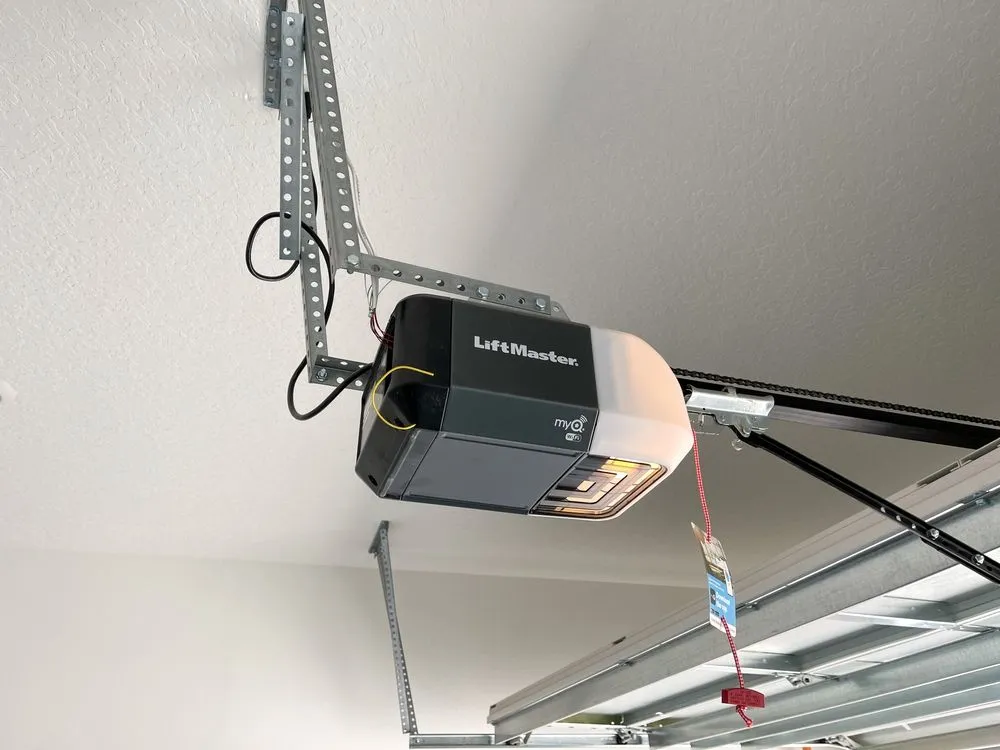
A beeping LiftMaster garage door opener can feel annoying, but it is usually the opener’s way of calling attention to a specific condition. In Mission Viejo, I often see homeowners ignore the beep because the door still moves. That can be risky if the beep is tied to safety sensors, door resistance, or an electrical fault that gets worse with repeated cycles.
This guide explains the most common reasons LiftMaster openers beep, what to check safely, and when the smartest move is to stop using the door and call a technician. It is written to be easy to follow, but still detailed enough to help you describe the issue clearly if you schedule service.
Quick Answer
Use this fast checklist to sort urgency:
- Beeping with normal door movement is often a notification, like battery backup, maintenance reminder, or a smart feature alert.
- Beeping with changes in movement is a warning. Watch for jerking, shaking, early reversal, or the door feeling heavy.
- Beeping with heat, smell, or loud grinding should be treated as urgent.
Before you do anything else, note these three details:
- When the beeping started (after a power outage, storm, heat wave, or router change)
- What the door does during a full cycle (smooth, hesitant, reversing, stopping)
- Whether the lights on the opener are flashing (and if the pattern repeats
If you want a deeper guide focused on how beeping pairs with movement changes, read LiftMaster Beeping With Door Issues: What It Signals.
Why LiftMaster Openers Beep In The First Place
LiftMaster uses beeps and flashing lights as a built-in alert system. Instead of silently failing, the opener tries to signal that something needs attention. Depending on the model, beeping may relate to:
- Backup battery status (low charge, aging battery, charging failure)
- Photo eye sensor input (blocked beam, weak alignment, intermittent signal)
- Safety reversal logic (unexpected resistance while closing)
- Travel and force monitoring (door not stopping where expected)
- Smart features and connectivity alerts (Wi Fi disconnects, setup issues)
- Internal fault detection (electronics, motor system, logic board problems)
- Reminder features (cycle count reminders, maintenance prompts)
Common Beeping Causes In Mission Viejo Homes
Backup Battery Needs Attention
What is happening: The opener is warning that the battery is low, aging, or not charging as expected.
Why it shows up locally: Power flickers and short outages can trigger battery alerts. Heat in a closed garage can also shorten battery life.
Safe checks:
- Confirm whether your opener has a battery backup compartment.
- Watch for a battery status indicator or alert light on the unit.
- Think back to recent outages or breaker trips.
Best next step: If the battery is failing, replacement is usually the real solution. A technician can match the correct battery type and confirm the charging system is healthy.
LiftMaster explains how different beep intervals on battery-backup models relate to power status and battery health in their support guide, LiftMaster beeping meaning and battery alerts.
Photo Eye Sensor Beam Trouble
What is happening: The sensors near the floor are not reliably seeing each other.
Why it happens: Dust, spiderwebs, bumped brackets, sunlight glare, or a slight twist in the sensor mount can weaken the signal.
Safe checks:
- Wipe both sensor lenses with a clean microfiber cloth.
- Confirm both brackets are solid and not loose.
- Clear stored items that may be close to the sensor line.
Best next step: If the door reverses or refuses to close, the sensor system should be checked carefully to keep the safety system working as designed.
Door Resistance And Binding Hardware
What is happening: The opener senses extra resistance and warns you through beeps, reversals, or strain sounds.
Why it happens: Worn rollers, track misalignment, bent track sections, or loose hinges can create drag. In coastal areas, hardware can also stiffen faster from moisture and grime.
Safe checks:
- Watch the door move and listen for rubbing or scraping at the same spot each time.
- Inspect tracks for obvious dents or bends.
- Check for a roller that looks tilted or out of line.
Best next step: If the door is binding, the door system should be inspected before the opener is overworked.
For a homeowner-friendly checklist of safe maintenance tasks (and what to leave to a technician), see the International Door Association guide, IDA care and maintenance checklist.
Travel Limits Or Force Monitoring Warnings
What is happening: The opener is not seeing the door stop where it expects, or it detects unusual effort.
Why it happens: As the door system changes over time, the opener can start “seeing” an abnormal load. This is common when the door balance shifts or the hardware starts wearing unevenly.
Safe checks:
- Observe whether the door closes fully, then immediately reverses.
- Notice if the door stops short or seems to “bounce” at the floor.
- Listen for a change in sound as the door approaches closed.
Best next step: When travel behavior changes, treat it as a sign the system needs inspection, not a sign to keep forcing cycles.
Safety Reversal Events
What is happening: The opener reverses while closing and signals an alert.
Why it happens: The system is designed to reverse when it senses an obstruction or unexpected resistance. That can be a real obstruction, or it can be a door issue that feels like one.
Safe checks:
- Inspect the floor area for small objects.
- Check that the bottom seal is not catching on a raised threshold.
- Note whether reversal happens at the same point each time.
Best next step: Reversal that repeats in the same spot often points to sensors, track alignment, or door balance issues.
Smart Features And Wi Fi Alerts
What is happening: Smart-enabled units may beep when the connection drops, setup is incomplete, or the system flags a status issue.
Why it happens: Router changes, new passwords, weak signal to the garage, or app updates can trigger alerts.
Safe checks:
- Confirm your Wi Fi is stable near the garage.
- Check the app for a specific alert message.
- Note if the beeping started after a router or password change.
Maintenance Reminder Alerts
What is happening: Some systems beep because a reminder feature is enabled.
Why it happens: The reminder can be enabled during setup or left on by a previous homeowner.
Safe checks:
- Inspect your wall control for a menu or settings option.
- Notice if the door works smoothly, but the beeping is consistent.
Best next step: Clearing reminders is model-specific. A technician can reset alerts without altering safety settings.

Internal Opener Faults
What is happening: The opener detects a fault in internal components such as electronics, motor system, or logic board.
Why it happens: Heat, age, and power events can stress internal parts.
Safe checks:
- Watch for flashing light patterns that repeat.
- Pay attention to inconsistent behavior like stopping mid-travel.
- Take any burning smell seriously.
For a pattern-based guide to help decode alert styles, read LiftMaster Beeping Codes Explained: What Each Pattern Means.
What To Check Safely Before You Call A Technician
You can gather helpful information without handling high-tension door hardware, and it can speed up garage door repair when a technician arrives.
- Run one full open and close cycle while watching closely.
- Write down the sequence of what happened step by step.
- Check sensor area cleanliness and alignment from a distance.
- Inspect track condition for dents, gaps, or rubbing marks.
- Listen for where the unusual sound starts: the opener area, track area, or door center.
- Notice the door feels changes: heavy, uneven, or slower than normal.
If the beep is driving you crazy and you want to quiet it without bypassing safety features, read How to Silence a Beeping LiftMaster Without Missing Alerts.
When Beeping Means Stop Using The Door
Stop using the door and call a technician if the beeping shows up with any of the signs below:
- The door shakes, jerks, or shudders
- You hear grinding or scraping
- The door reverses repeatedly with no clear obstruction
- The door feels heavy, or one side looks uneven
- You hear a loud bang from the door system
- You notice a burning smell or see signs of overheating
- The opener behaves unpredictably or activates without a clear command
How To Reduce Future Beeping And Avoid Repeat Alerts
A few simple habits can prevent repeat alerts and reduce wear:
- Keep sensor lenses clean and the area near the floor clear.
- Avoid rapid repeated cycling, especially during hot afternoons in Mission Viejo.
- Watch and listen monthly for new scraping, rubbing, or hesitation.
- Address the door drag early so the opener is not forced to compensate.
- Keep the opener area ventilated when possible to reduce heat stress.
Steps To Restore Safe Operation Fast
If your LiftMaster is beeping and you cannot tie it to a simple cause like sensor cleanliness or a recent outage, document what you see. Note the beep timing, any repeating light pattern, and whether the door movement changed. If it is safe, take a few photos of the opener, the sensors, and both tracks from inside the garage.
When you want an expert to inspect the system and restore safe operation, Royale Garage Door Service can help in Mission Viejo. Contact us or give us a call to schedule a professional inspection and get a clear answer on what the opener is warning you about.